Content-Type
Content-Type 해당 개체에 포함되는 미디어 타입 정보 컨텐츠의 타입(MIME 미디어 타입) 및 문자 인코딩 방식(EUC-KR,UTF-8 등)을 지정한다.
| Content-Type |
| 1) XML Media의 타입 - Content-Type: text/xml - Content-Type: Application/xml - Content-Type: Application/xml-external-parsed-entity - Content-Type: Application/xml-dtd - Content-Type: Application/mathtml+xml - Content-Type: Application/xslt+xml |
| 2) Application의 타입 - Content-Type: Application/EDI-X12 <-- Defined in RFC 1767 - Content-Type: Application/EDIFACT <-- Defined in RFC 1767 - Content-Type: Application/javascript <-- Defined in RFC 4329 - Content-Type: Application/octet-stream : <-- 디폴트 미디어 타입은 운영체제 종종 실행파일, 다운로드를 의미 - Content-Type: Application/ogg <-- Defined in RFC 3534 - Content-Type: Application/x-shockwave-flash <-- Adobe Flash files - Content-Type: Application/json <-- JavaScript Object Notation JSON; Defined in RFC 4627 - Content-Type: Application/x-www-form-urlencode <-- HTML Form 형태 - Content-Type: Application/x-java-serialized-object <-- 직렬화된 자바객체 * x-www-form-urlencode와 multipart/form-data은 둘다 폼 형태이지만 x-www-form-urlencode은 대용량 바이너리 테이터를 전송하기에 비능률적이기 때문에 대부분 첨부파일은 multipart/form-data를 사용하게 된다. |
| 3) 오디오 타입 - Content-Type: audio/mpeg <-- MP3 or other MPEG audio - Content-Type: audio/x-ms-wma <-- Windows Media Audio; - Content-Type: audio/vnd.rn-realaudio <-- RealAudio; 등등 |
| 4) Multipart 타입 - Content-Type: multipart/mixed: MIME E-mail; - Content-Type: multipart/alternative: MIME E-mail; - Content-Type: multipart/related: MIME E-mail <-- Defined in RFC 2387 and used by MHTML(HTML mail) - Content-Type: multipart/formed-data <-- 파일 첨부 |
| 5) TEXT 타입 - Content-Type: text/css - Content-Type: text/html - Content-Type: text/javascript - Content-Type: text/plain - Content-Type: text/xml |
| 6) file 타입 - Content-Type: application/msword <-- doc - Content-Type: application/pdf <-- pdf - Content-Type: application/vnd.ms-excel <-- xls - Content-Type: application/x-javascript <-- js - Content-Type: application/zip <-- zip - Content-Type: image/jpeg <-- jpeg, jpg, jpe - Content-Type: text/css <-- css - Content-Type: text/html <-- html, htm - Content-Type: text/plain <-- txt - Content-Type: text/xml <-- xml - Content-Type: text/xsl <-- xsl |
Ex) Content-Type: text/html; charset-latin-1 해당 개체가 html 텍스트 문서이고, iso-latin-1 문자 인코딩 방식으로 표현되는 것을 의미한다.
Content-Disposition 응답 Body를 브라우저가 어떻게 표시해야할지 알려준다. inline인 경우 웹페이지 화면에 표시되고, attachment인 경우 다운로드한다.
만약 Body에 담길 data가 커그나 다른 형식 HTTP response가 여러 번 나가야 한다면(multipart) 아래와 같은 형식으로 나가게 된다.
첫 번째 Content-Type: multipart/form-data;boundary="boundary"
두 번째 Content-Disposition: form-data; name="field1"
세 번째 Content-Disposition: form-data; name="field2"; filename="example.txt"
ex)
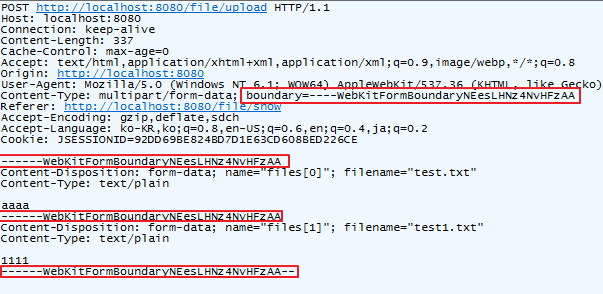
서버에서 String return 시 applictation/json이라면 " 가 붙는다
application/json→ "test" (JSON 문자열)
text/plain→ test (순수 텍스트)
| 어노테이션데이터 | 위치 | 주로 받는 Content-Type | 예 |
| @RequestBody | HTTP Body | application/json, application/xml, text/plain 등 | JSON 객체 |
| @RequestParam | Query String / Form Body | application/x-www-form-urlencoded, Query String | 폼 값 |
| @ModelAttribute | Query String / Form Body | application/x-www-form-urlencoded, multipart/form-data | 객체 바인딩 |
'WEB개념 > NETWORK & PROTOCOL' 카테고리의 다른 글
| CORS (Cross-Origin Resource Sharing) (0) | 2025.02.17 |
|---|---|
| 공인IP, 사설IP, NAT, localhost, 0.0.0.0 (0) | 2024.12.30 |
| [NETWORK] EJB (0) | 2023.03.30 |
| [NETWORK] OSI7계층, 허브 (L1), SWITCH (L2), ROUTER (L3, L4) (0) | 2021.11.15 |
| [NETWORK] IP, SUBNET / DHCP / DNS / HOSTS (0) | 2021.11.12 |

